cofad 0.4: A Rebuilt Interface for Contrast Analysis
cofad is an R package and Shiny app for contrast analysis (Titz & Burkhardt, 2021). Version 0.4.0 has recently arrived on CRAN and is also available on GitHub. It is the largest update to cofad so far and, above all, a substantial overhaul of its graphical interface.
Contrast analysis is useful when a theory predicts a specific pattern of means. Instead of asking the omnibus ANOVA question—whether there is a difference somewhere—it tests that prediction directly. A good theory can therefore be tested more precisely and often with substantially greater power (Henninger et al., 2025).
In this post, we will look briefly at some of the most important new features in cofad 0.4.
Examples and automatic design detection
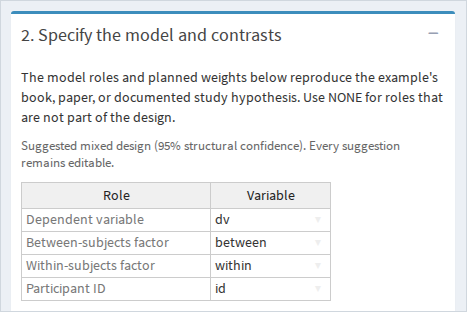
The app now includes categorized examples for between-subjects, within-subjects, and mixed designs. Each example loads the variable roles and contrast weights documented in its original book or paper, making it easier to reproduce published analyses or begin teaching without first preparing a data file.
For uploaded data, cofad examines replication, crossing, and nesting to suggest the dependent variable, factors, and participant identifier. These suggestions are deliberately conservative and always editable. If the structure is ambiguous, the app leaves uncertain roles open for manual selection instead of forcing a design. The same detector is available from R as detect_design().
Competing hypotheses
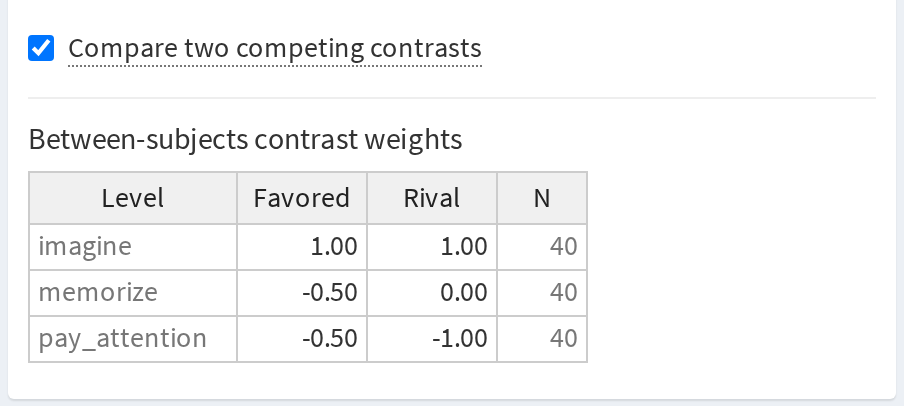
Version 0.4 brings competing-contrast analysis into the graphical interface. After selecting Compare two competing contrasts, the weight tables show separate Favored and Rival hypotheses. cofad standardizes both vectors before testing their difference, matching the behavior of lambda_diff() in the R API. This matters because simply subtracting two unstandardized sets of weights can produce a misleading comparison when their variances differ (Henninger et al., 2025).
More transparent output
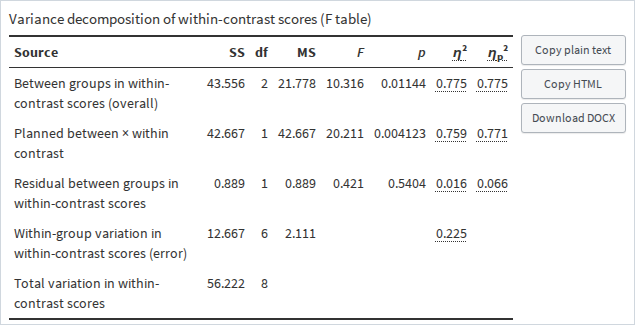
The new F-output table shows the variance decomposition behind the analysis: sums of squares, degrees of freedom, mean squares, F, p, ordinary eta squared, and partial eta squared. Calculation tooltips make the quantities easier to inspect, while the table can be copied as aligned text or HTML and downloaded as a DOCX file.
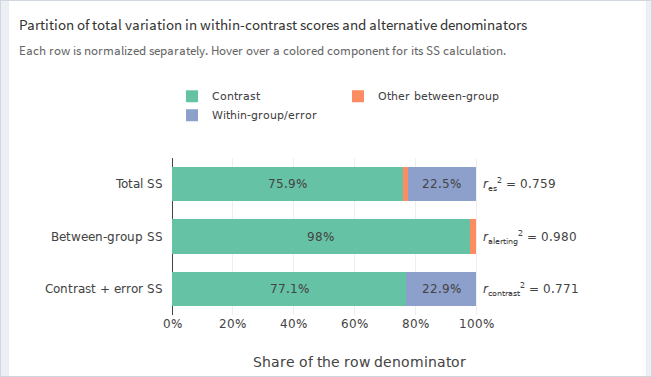
An interactive graphic presents the same result from three complementary perspectives: the share of total variation, the share of between-group variation, and the contrast-plus-error denominator. Hovering over a component reveals the corresponding sum-of-squares calculation. This makes the differences among \(r_\mathrm{es}\), \(r_\mathrm{alerting}\), and \(r_\mathrm{contrast}\) much easier to see.
Magnitude or pattern fit
Within-subjects and mixed contrasts can now use either participant-level L scores or r scores. The default L score is a weighted sum and retains response magnitude. It is appropriate when the size of the predicted increase or decrease matters. The new r score correlates each participant’s response profile with the contrast weights, emphasizing agreement with the predicted shape rather than amplitude.
The choice is available in both the app and the R API:
calc_contrast(
  dv = reading_test,
  within = music,
  lambda_within = weights,
  id = participant,
  data = my_data,
  within_score = "r"
)
The distinction is especially useful when several repeated conditions define a meaningful profile.
Other important changes
Version 0.4 also corrects observed-sample sums of squares and pooled error variance for between-subjects analyses with unequal group sizes. Earlier versions used unweighted group means and variances in places where the calculations needed to account for group size. Analyses with equal group sizes were unaffected, and raw and aggregated input now use consistent formulas. Directional effect-size calculations also retain their signs consistently.
The Help panel now lets you copy both the recent contrast-analysis tutorial (Henninger et al., 2025) and the original cofad software paper (Titz & Burkhardt, 2021) in APA 7 or BibTeX format.
Try cofad 0.4
Install the release from CRAN:
install.packages("cofad")The regular server-backed app is available at cofad.titz.science. A browser-only webR version is also available from GitHub Pages and requires neither a local R installation nor a Shiny server.
The source code, complete change log, documentation, and issue tracker are in the cofad GitHub repository. Feedback and bug reports are very welcome.